Google Cloud Platform
Completion requirements
Google Cloud Platform
Console
The Google Cloud Platform console (https://console.cloud.google.com/) is the place from where we manage all projects. A project is the highest level of aggregation within the Google Cloud Platform. Therefore, to work on the platform, we must first create our project.
Let's first see what the console shows us on the main screen or dashboard:
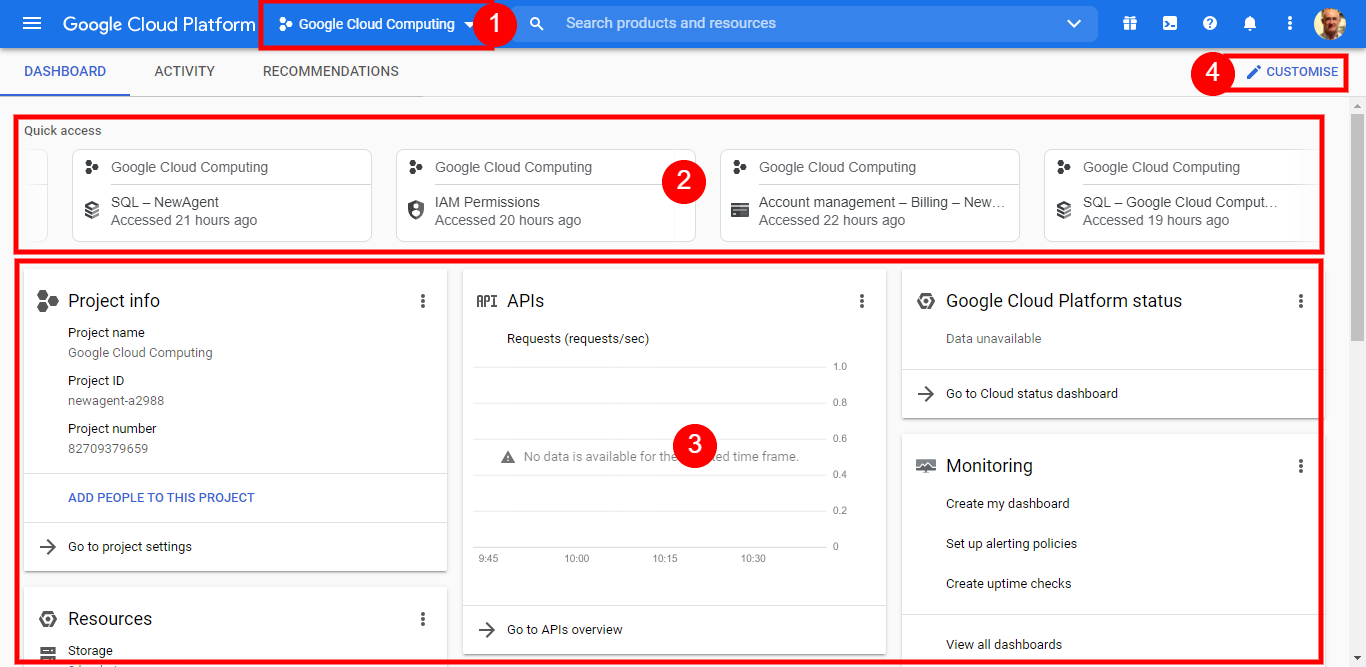
- The top blue bar shows the current project. From this drop-down menu, we can swap between projects or create a new one.
- This area will show the last accessed services, allowing us to access our more frequently used services quickly.
- This section is our dashboard. Here we have all the information we need to manage and control the project. We can customise the dashboard with the most useful information blocks as we gain experience using the different services.
- From this button, we access dashboard customisation