
Adding code
Adding code
As mentioned before, we need to add some coding to connect the Arduino Uno to Internet (via the ESP8266 WiFi Module). The following lines will also show the code to insert for interaction with IFTTT.
Let’s start including two libraries to drive the WiFi module and IFTTT:
#include <ESP8266WiFi.h>
#include <IFTTTMaker.h>
Then, add information related to WiFi connection (SSID and password):
#define WIFI_SSID "your SSID here"
#define WIFI_PASSWORD "your password here"
In the same way, we add information regarding IFTTT Applet (key and event name):
#define IFTTT_API_KEY "ceubX8trC3ZXKFTrEMXc-Z"  //the <a class="autolink" title="Webhooks key" href="https://learn.riotc4vet.eu/mod/lesson/view.php?id=3005">Webhooks key</a>.
#define IFTTT_EVENT_NAME "street_light_sensor" //the event name.

WiFiClientSecure client;
IFTTTMaker ifttt(KEY, client);
Add the following lines into the void
setup() function to establish an Internet connection and send sensor data
to IFTTT:
WiFi.mode(WIFI_STA);
WiFi.begin(WIFI_SSID, WIFI_PASSWORD);

ifttt.triggerEvent(EVENT_NAME, sensorValue);
Each time the IFTTT Webhooks gets data from the sensor, it adds a new
row into the Google Sheets spreadsheet (creating a new spreadsheet if it
doesn’t exist) and stores in the first
column the date and time the lecture occurs. In the second column, it stores
the name of the event (remember, you can send lectures from different sensors
to the same spreadsheet, so it’s useful to differentiate each one from the
others).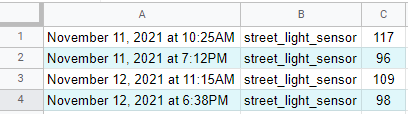
The third column stores the sensor value (from the sensorValue variable).
At the same time, the smartphone receives a notification from IFTTT (it requires the installation of the IFTTT app in the smartphone).